Slackify for Google Chat brings a Slack-style skin to Chat
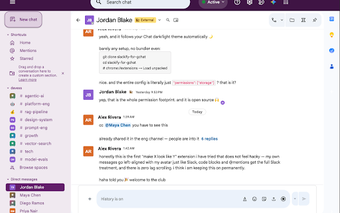
Slackify for Google Chat, developed by Sujeet (sujeet100), restyles the Google Chat web interface to resemble Slack for users who prefer that aesthetic. It alters appearance elements such as fonts, colors, and layout density so conversations appear more channel-focused while keeping Google Chat's behavior intact. The extension offers several Slack-inspired themes and display options, aimed at professionals and teams who migrated to Google Workspace but miss Slack's visual organization.
What does Slackify actually change inside Google Chat?
The extension modifies only the visual layer of the web app, applying a Slack-like look without changing core behaviors like threading, notifications, or search. The skin operates locally in the browser by altering style rules rather than changing Chat code paths. A small interface lets users toggle individual visual elements on or off so they can test different looks without a full reload.
How does Slackify handle privacy and code transparency?
Slackify is designed with privacy in mind: it makes no network requests and therefore cannot read, store, or transmit message content. The project is fully open-source and hosted on GitHub, which allows public audit of the code that performs the UI restyling. The developer emphasizes local, client-side modifications rather than any third-party telemetry.
Will Slackify keep working with Chat and Chromium browsers?
The extension targets the Google Chat web application and runs in Chrome and other Chromium-based browsers. Because it only adjusts presentation, the design minimises the chance of interfering with Chat updates. That approach keeps the extension lightweight and reduces the need for frequent maintenance when the host web app changes.
Who benefits from Slackify and what trade-offs should they accept?
Slackify suits users who value visual continuity after moving from Slack to Google Workspace and who want a familiar interface without changing workflows. The trade-off is deliberate: it does not add Slack features, integrations, or backend behaviors. People seeking deeper workflow parity across platforms should not expect functional equivalence from this skin.
A focused cosmetic solution for visual continuity, not a functional replacement
Slackify is a narrow, practical choice for users who prioritize interface familiarity in Google Chat and prefer a Slack-like visual environment. It fits those who want a low-risk visual adjustment rather than changes to messaging behavior. If matching appearance matters more than replicating platform-specific workflows, this extension delivers a targeted outcome for that purpose.